
How to use this portal
Just a few quick notes to get you up and running ASAP!
Section Overview:
-
PRSONAS-DXP Documentation
We've included the reference documentation directly below. We recommend you read this to gain a basic understanding of the ecosystem and the overall software architecture. Understanding how each component of the PRSONAS-DXP works together, you may find yourself chasing ghosts! -
PRSONAS-DXP Releases
Release notes from each version of the DXP. We try hard to maintain backward compatibility. However, we highly recommend making regular migrations to newer versions when released. This not only introduces you to new features and improvements to existing features, but also often addresses bugs or unintended functionality reported by others. Our goal is to support up to 5 previous versions, yet with rapid advances in our technology stack and the AI industry as a whole, that is not always possible. -
Technical Support
To handle support requests effectively and maintain an audit trail to prevent requests from being lost in cyberspace or email, please use the "Open Support Ticket" link at the bottom of the page. For convenience, here is a button to open a support ticket:
-
Business Requirement
We need at least one piece of business terms thrown in here for the developers!
For each deployment, include a PRSONAS logo (minimum 150 px width) in one of the following ways: (1) a startup splash screen, (2) prominently displayed on a primary interface, or (3) a dedicated credits screen.
Click the image below for a full-resolution official logo.
 This attribution requirement is a core term of the license and ensures proper recognition of the underlying patented innovation powering your application.

PRSONAS-DXP Documentation
Click the red '+' to expand each section.
QuickStart
If you're one to jump in feet first, then you're at the right place!
Step 1—Review the Overview section below to get a basic understanding of the significant components of the PRSONAS-DXP Development Environment.
Step 2—Download the free version of the Unity engine. We use this game engine to build and deploy the avatars and their digital personalities. You can find that download here: https://unity.com/download
Step 3—Download the latest PRSONAS-DXP from the Releases section below. It will install the tools defined in the overview so you can quickly get up and running.
Go change the world!
PRSONAS-DXP: Overview
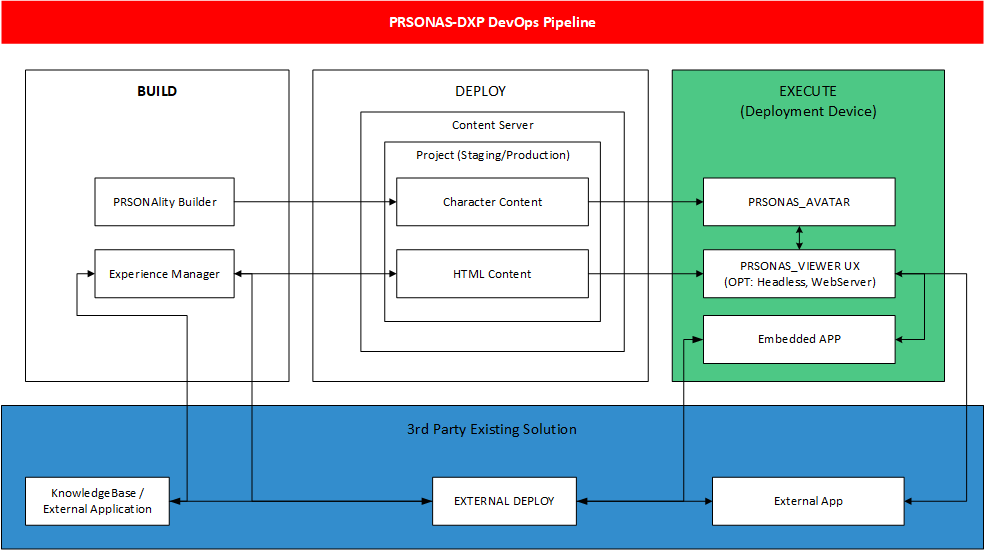
The customer experience is built using a combination of tools and hosted services:
(BUILD) Developer Environment:
- PRSONAS PRSONASality Builder: Visual avatar creation tool allowing the developer to customize the appearance, narrative, languages, and gestures of your digital personality.
- Partner Developer Environment: Create your User Experience in the development environment of your choice, integrating with the PRSONAS-DXP SDK.
- PRSONAS UX Frameworks: Provide templates UX framework for quickly development custom solutions. These frameworks help you get your UX up and running quickly. Once your UX is ready for testing or deployment, you can use the Experience Manager Tool.
- Experience Manager: Use the PRSONAS Experience Manager to log in and upload your HTML-based user experience to the PRSONAS-hosted content server.
(PUBLISH) PRSONAS Hosted Content Service and Services
- Content Server: PRSONAS hosts a cloud-based content server. This server offers staging and production repositories for each experience and PRSONALity Profile to test and publish end-user experiences.
(EXECUTE) Customer-facing deployment device:
- PRSONAS Avatar - A Windows-based application that displays the real-time 3D rendered character.
- PRSONAS Viewer—This Chromium-based custom browser application overlaps the Avatar, hosting the client-developed user interface and providing bilateral communications to the PRSONAS SDK and hosted services.
PRSONAS-DXP: PRSONASality Builder
The PRSONAS PRSONASality Builder is a visual avatar creation tool that allows the developer to customize your digital personality's appearance, narrative, languages, and gestures.
You will require Unity Assets for use with the PRSONASality Builder, which includes the following:
- Unity Asset Package (3GB download)*
*You will be prompted to download the asset when you first run PRSONASlity Builder with a sample project. Alternatively, to reset the asset package to its default state, you may delete ./assets/assetgeneration/, and the content will be downloaded on the next run. - Sandbox Example
- Motion Library
Here is a list of short tutorial videos for each significant feature of this powerful tool:
PRSONAS-DXP: SDK
The PRSONS-DXP SDK is JavaScript SDK that external experiences use to interact with the PRSONAS system.
Below are a few resources to assist in utilizing the SDK for your projects:
PRSONAS-DXP: UX Framework
To create your PRSONAS experience, you develop an HTML-based UI leveraging the PRSONS-DXP SDK. A PRSONAS UX Framework is provided to help you get your UX up and running quickly. Once your UX is ready for testing or deployment, you use the PRSONAS UX Manager Tool to log in and upload your user experience to the PRSONAS-hosted content server.
The PRSONAS DXP Framework is a module with the custom Prsonas framework using the MVC structure pattern. It is designed as a working engine that uses a JSON configuration approach to build the page HTML scaffolding and navigation flow, which is laid out via CSS.
DXP has prebuilt functional templates that include language selection and full integration with the Prsonas SDK. It manages the PRSONAS Avatar system using the DXP SDK, where button and page events trigger animation sequences with multi-language support.
The framework supports configurable language handling, displaying the associated language copy through a language JSON file.
Other features include:
- Directory lookup service
- Name matching service
- Admin features to support various troubleshooting and avatar configuration needs
IHA has prebuilt functional integrations that expand beyond the core functionalityof the DXP framework. These include support some of our 3rd party integration partners.
These include:
- MappedIn Indoor Wayfinding Integration
See: www.MappedIn.com - iQueue queue management integration
See: www.CobaltFire.com - Communication Services for SMS/Text
PRSONAS IHA UX Framework Reference Guide




.png)

 info@prsonas.com

 +1 (910) 490-3781